Here's the problem: I have a bot that uses motor B and an arm to lift a heavy item. The motor is powerful enough to lift the item. After the item is lifted, the bot program continues on its way (maybe moving forward or backwards or moving into a LOOP block with a sensor trigger.) The problem occurs after motor B completes its lifting motion. As soon as the program moves forward, the weight of the heavy object causes motor B to spin in the opposite direction (gravity, not powered) and the arm (and object) slowly lowers (sometimes quickly).
So my next solution was to put motor B's action in parallel with the rest of the graphical code. I created a branch off of the main one and put motor B there... but here's the next problem. I can either program motor B to spin (rotation or degrees) in an Unlimited fashion, BUT I must have something for motor B to lift the item against and then when it hits, keep applying upward force (motor B still running, but the motor isn't actually spinning). This might work, but I actually need the item held parallel to the floor and not being pushed against something to hold it... once again, doing it this way works until motor B finishes its rotation and then the heavy object lowers again to the ground.
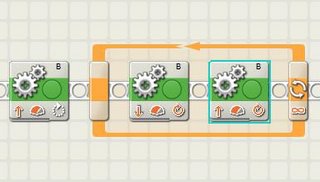 My solution isn't elegant, but I figured it was worth sharing in case someone else encounters this problem. What I did was configure Motor B to spin 90 degrees (.25 rotations) and at that point the object is being held, parallel to the ground. I then inserted a LOOP block - inside the loop block is MOVE block for Motor B to spin down .1 rotation and then another MOVE block that has Motor B spin up .1 rotation... I set the LOOP to loop Forever, and it worked... the bot holds the object parallel to the floor... the .1 rotation up and down motion isn't even noticeable... but the solution is that the motor is quickly spinning up and down, up and down and never powers down for the object to sink down again.
Anyone have a better solution? I tried applying a MOVE block that stops Motor B (braking) after the initial Motor B block lifts the object, but I didn't think it would work... and it didn't. What is really needed is for the MOVE blocks to have a check box that says "After motion is completed, lock the motor" or something similar to keep the motor from spinning.
If anyone else has any ideas, please post them.
So my next solution was to put motor B's action in parallel with the rest of the graphical code. I created a branch off of the main one and put motor B there... but here's the next problem. I can either program motor B to spin (rotation or degrees) in an Unlimited fashion, BUT I must have something for motor B to lift the item against and then when it hits, keep applying upward force (motor B still running, but the motor isn't actually spinning). This might work, but I actually need the item held parallel to the floor and not being pushed against something to hold it... once again, doing it this way works until motor B finishes its rotation and then the heavy object lowers again to the ground.
 My solution isn't elegant, but I figured it was worth sharing in case someone else encounters this problem. What I did was configure Motor B to spin 90 degrees (.25 rotations) and at that point the object is being held, parallel to the ground. I then inserted a LOOP block - inside the loop block is MOVE block for Motor B to spin down .1 rotation and then another MOVE block that has Motor B spin up .1 rotation... I set the LOOP to loop Forever, and it worked... the bot holds the object parallel to the floor... the .1 rotation up and down motion isn't even noticeable... but the solution is that the motor is quickly spinning up and down, up and down and never powers down for the object to sink down again.
Anyone have a better solution? I tried applying a MOVE block that stops Motor B (braking) after the initial Motor B block lifts the object, but I didn't think it would work... and it didn't. What is really needed is for the MOVE blocks to have a check box that says "After motion is completed, lock the motor" or something similar to keep the motor from spinning.
If anyone else has any ideas, please post them.