Line Follower using EV3

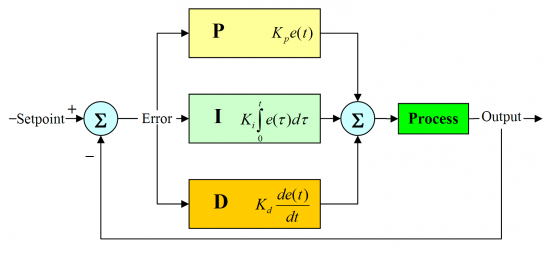
Ahhh the classic challenge of following a black line!  Of course this can be achieve quite simply by using the zig zag method but if you want a high performance line following robot you're going to need a little more math!

Line Following with a PID Controller

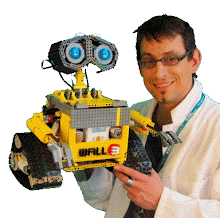
Image by:  Miguel Angel Blanch Lardin


Luckily Miguel the guy behind The Technic Gear blog has recently published a fantastic tutorial explaining in details how to create a PID controller line following robot using LEGO MINDSTORMS EV3.  


I invite you to follow his tutorial found here http://thetechnicgear.com/2014/03/howto-create-line-following-robot-using-mindstorms/ With the help of his pseudo code you can write your own line following program or try his program thanks to the supplied EV3 source code.  Remember to give credit to his work if you use part or all of his code in a program for one of your competition or school work. Also do leave a comment here or on his own website about your experience with this tutorial it will mean a lot to him.

Another cool proportional control robot made by Miguel is a Wall Following robot shown here:


Miguel has many other project in mind. For example, he shared with me his intention of doing a two light sensor line follower as well as a tutorial on a self balancer (like Gyro Boy) using the EV3 Gyro Sensor from LEGO.

Don't miss any of his work, be sure to LIKE his Facebook page https://www.facebook.com/thetechnicgear follow his blog http://thetechnicgear.com/ and subscribe to his Youtube Channel http://www.youtube.com/user/thetechnicgear

Happy programming :)

: . .

Popular posts from this blog

Celebrating 25 Years of MINDSTORMS

In celebration of the 25th Anniversary of MINDSTORMS, we take a trip through history. Please also visit ROBOTMAK3RS Community every week as we highlight different projects all through 2023 in celebration of the anniversary. Some of the early history is based on the content shared by  Coder Shah  in our  MINDSTORMS EV3 Community Group . Some of the text and links may have been edited from his original posts for consistency and clarity.  1984 - Kjeld Kirk Kristiansen watched a TV program called "Talking Turtle," where MIT professor Seymour Papert demonstrated how children could control robot "turtles" using LOGO, a programming language he developed. 1988 - The collaboration between MIT and LEGO resulted in LEGO TC Logo in 1988, which allowed students to control LEGO models using computer commands. The video shows Papert demonstrating TC Logo. 1990 - LEGO TC Logo was hampered since the robots you built had to be tethered to a personal computer. LEGO and MIT...

ROBOTMAK3RS Review: LEGO River Steamboat

I thought the LEGO River Steamboat would be an interesting set for a ROBOTMAK3R review for a few reasons. First, the LEGO designer of the model is Marina Stampoli, a long-time collaborator of the late ROBOTMAK3R Vassilis Chryssanthakopoulo s. From earlier collaborations with Vassilis, I  knew Marina was incredibly talented, with an eye for aesthetics and functionality. Her background in architecture is particularly useful for her relatively new position at LEGO. Her other sets include the Magic of Disney (21352), Message Board (41839), and Red London Telephone Box (21347). Second, watching Marina's reveal video  and reading her designer interview made this set even more tempting to build. The gearing mechanisms running through the model gave way to many opportunities for automation using LEGO robotics elements. Since ROBOTMAK3RS is all about adding interactivity and automation to LEGO brick, I thought it would be fun to see where and how LEGO robotics could be added to this s...

Part 3: Restoring the LEGO MINDSTORMS Robot Inventor App on Windows

Summary: This blog is written by Sizlaq and is about how he restored the LEGO MINDSTORMS Robot Inventor Windows app using an archived Appx installer and a backup of the app’s downloaded content. Important note: The files linked in this post are external archive downloads for the LEGO MINDSTORMS Robot Inventor app and its related content. LEGO MINDSTORMS, LEGO Education and Robot Inventor are LEGO Group products/trademarks. Use these downloads only where you are legally entitled to do so and only for legitimate preservation, repair, education or personal restore purposes. I do not own the LEGO app or content, and the links are provided as a convenience for people trying to restore a legacy installation. Download and run archived software at your own risk, and scan files before installing them. Why these backups mattered The reason I started looking into this was simple: LEGO had announced that the LEGO MINDSTORMS Robot Inventor apps were being discontinued...